Rock, Paper, Scissors (Angles)
http://www.instructables.com/id/Rock-Paper-Scissors-Math-Game-To-Teach-Angles/
Monday, March 31, 2014

Friday, March 14, 2014
Playingmondo
Playingmondo Basics
https://www.dropbox.com/s/rw2ekmmwpnbs6wy/Playing%20Mondo%20Tutorial%20Video.mov
Playingmondo Mondo Builder
http://www.playingmondo.com/lpilot/Playingmondo/docs/MondoBuilder_Userguide_January19-2012.pdf
More Coming Soon!
Wednesday, March 12, 2014
EAST Pre-Conference Highlights
Please congratulate the following students for being selected to represent the school at EAST Conference, March 19-21:
Eli Early
Autumn Edmondson
Angel Gonzalez
Tiyanna Johnson
Kamryn Singleton
William Wilson
Jakiyah Woods
Jaylen Wright Thomas Miller
Alternates (attend if notified):
Jordan Harris
Nia Joyner
Jermani Johnson
Eron Surrat
Trinity White
I also want to recognize the following:
Kamryn Singleton, 1st Place Website K-3 AAIM Student Media Festival
Teona Williams and Shanyla Gill, EAST Poster Submission (Results TBA)
Tiyanna Johnson, TRI-WATER Team Leader, EAST NSP and Display Submission (Results TBA)
William Wilson, Mapping Team Leader, ESRI Story Map Submission (Results TBA)
EAST Conference Team Break-out Session: Creating the Great Ark Adventure - March 20, 10:30-12
Eli Early
Autumn Edmondson
Angel Gonzalez
Tiyanna Johnson
Kamryn Singleton
William Wilson
Jakiyah Woods
Jaylen Wright Thomas Miller
Alternates (attend if notified):
Jordan Harris
Nia Joyner
Jermani Johnson
Eron Surrat
Trinity White
I also want to recognize the following:
Kamryn Singleton, 1st Place Website K-3 AAIM Student Media Festival
Teona Williams and Shanyla Gill, EAST Poster Submission (Results TBA)
Tiyanna Johnson, TRI-WATER Team Leader, EAST NSP and Display Submission (Results TBA)
William Wilson, Mapping Team Leader, ESRI Story Map Submission (Results TBA)
EAST Conference Team Break-out Session: Creating the Great Ark Adventure - March 20, 10:30-12
Wednesday, March 5, 2014
King Training Maps (Submission 2014) Description
Here are some details about this map:
1-I wanted to do a project about smoking because my grandfather
smokes and I worry about his health. I decided to map the smoking rates
of each state and see which state smokes the least and most.
2-The map can benefit EAST students making posters about smoking
and a visual to any observer as to what is going on with smoking in each state.
3-I started this project to teach others (students and
clients/partners) how to map but decided that it could be used for other
student projects not just for training along with our George Hines, MLK, and
Arkansas Cemeteries Maps.
4-One of the problems I had was creating the map into a Story
Map. We are still trying to figure out the steps to creating a webserver
but haven’t figured it out yet. We completed a story map using just arcgis.com
> Creating a Web Application but could not put all the training maps
together as we had planned.
5-So far team members have:
*completed marking points for each state and smoking rate and next
steps; continuing to mark points of
interest for the George Hines Family Tree Map, MLK Map, and we are expecting to
begin the Arkansas Cemeteries map next.
6- Next steps for this project:
*locating
photographs/documents to help emphasize the story to be told by the maps
(example: smoking issues faced by
states) *trying to complete a similar map in ArcGIS Desktop
*compiling the smoking map
with all training maps into one Story Map
(Smoking Map, George H. Hines, MLK, Life and Times, and Arkansas
Cemeteries).
7-Skills learned in doing the
project:
*accessing and login into an online mapping program (arcgis.com)
*search and find location
*mark points adding description
*view and scale location
*saving
a map
Tuesday, March 4, 2014
Out of School Assignments
Assignment 1
Name of Designer*
First Name
Last Name
Designer Email*
Name(s) of Additional Designers (if more than one)
School Name*
Project Title*
Facilitator* Deidre Williams
Facilitator Email* deidre.williams@lrsd.org
Assignment 2
Email or text video to me talking about assigned project (guide linked):
http://eastatking.blogspot.com/2014/02/project-videos.html
Tiyanna-TRIWATER
Jaliyah-KEYP
TBA
Name of Designer*
First Name
Last Name
Designer Email*
Name(s) of Additional Designers (if more than one)
School Name*
Project Title*
Facilitator* Deidre Williams
Facilitator Email* deidre.williams@lrsd.org
Assignment 2
Email or text video to me talking about assigned project (guide linked):
http://eastatking.blogspot.com/2014/02/project-videos.html
Tiyanna-TRIWATER
Jaliyah-KEYP
TBA
Friday, February 28, 2014
Computer Lab Lesson: Multimedia
NETS Standards:
Use It and Create It
Common Core:
Use digital tools to produce . . .
(1) Students are meeting one-on-one, in small groups, and/or whole group periodically to begin creating a portfolio using PowerPoint (all students k-5 will begin with a title slide (input name) and at least 1 other slide (insert their technology picture).
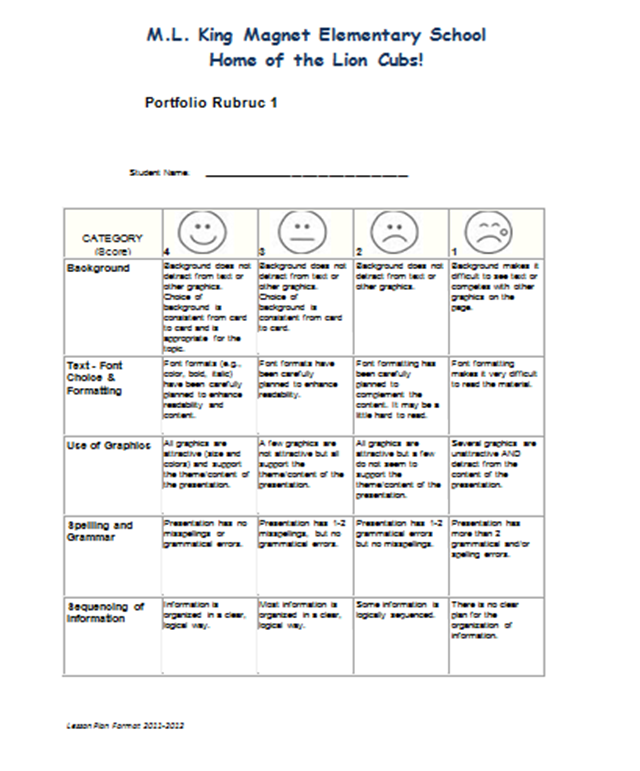
(2) Students should review the rubric or parts (K, 1, and 2) periodically (picture below) .
(3) Students should review the lesson/portfolio vocabulary priority words (whole group) and then access the full vocabulary list on individual computers or whole group (access the link below with assistance as needed):
https://www.spellingcity.com/view-spelling-list.html?listId=16962511&x=8e698 (students should focus on words that they do not know the meaning of or can not spell)
(4) With assistance as needed, students should create a screenshot (Ctrl = PrtScn) of a website that we use in the computer lab (example: bbc dance mat typing (show your level success), first in math (show your points/stickers), etc. The screenshot should be added to their portfolio as slide 2.
Use It and Create It
Common Core:
Use digital tools to produce . . .
(1) Students are meeting one-on-one, in small groups, and/or whole group periodically to begin creating a portfolio using PowerPoint (all students k-5 will begin with a title slide (input name) and at least 1 other slide (insert their technology picture).
(2) Students should review the rubric or parts (K, 1, and 2) periodically (picture below) .
(3) Students should review the lesson/portfolio vocabulary priority words (whole group) and then access the full vocabulary list on individual computers or whole group (access the link below with assistance as needed):
Priority Words
Multimedia
Portfolio
PowerPoint
Slideshow
(4) With assistance as needed, students should create a screenshot (Ctrl = PrtScn) of a website that we use in the computer lab (example: bbc dance mat typing (show your level success), first in math (show your points/stickers), etc. The screenshot should be added to their portfolio as slide 2.
Thursday, February 27, 2014
Student's Shoe Drive Inspires Ms. UAPB
Last school year, Tiyanna lead a team that sponsored a shoe drive to benefit the Ozark Water Project. The Ozark Water Project's mission is to "alleviate as much human suffering as possible by providing affordable footwear and a cup of clean, fresh water for those who thirst." The shoes collected are sold for cents per pound which provides the Ozark Water Project some funding for equipment and travel to projects in countries like Kenya for drilling wells and Haiti for water purification systems.
This school year, our EAST program was contacted by Ms. UAPB's mentor. She expressed that Ms. UAPB was interested in assisting in a shoe drive this school year. Recently, to our surprise, we were contacted again about the shoe drive's results, an estimated 200-300 pairs of shoes (pictured below).

Team members of the EAST project are extremely excited about and thankful for the shoes collected on our behalf and are still working with the Ozark Water Project. The team is researching and developing an activity booklet with the intention to provide curriculum integrated/standards based activities for the Ozark Water Project and other booklets (Drinking More Water; Sustaining Waterways). The booklet could be available online or in print for partners and
schools. Why not help the community and build skills for academic proficiency and beyond at the same time? This is true for the EAST Team members and their future booklet users.
Look back at this post for an update soon.
This school year, our EAST program was contacted by Ms. UAPB's mentor. She expressed that Ms. UAPB was interested in assisting in a shoe drive this school year. Recently, to our surprise, we were contacted again about the shoe drive's results, an estimated 200-300 pairs of shoes (pictured below).
Team members of the EAST project are extremely excited about and thankful for the shoes collected on our behalf and are still working with the Ozark Water Project. The team is researching and developing an activity booklet with the intention to provide curriculum integrated/standards based activities for the Ozark Water Project and other booklets (Drinking More Water; Sustaining Waterways). The booklet could be available online or in print for partners and
schools. Why not help the community and build skills for academic proficiency and beyond at the same time? This is true for the EAST Team members and their future booklet users.
Look back at this post for an update soon.
Subscribe to:
Posts (Atom)